
Olimex UEXT-CH390 vs W5500: Choosing a 100Mbps SPI Ethernet Path for Pico and ESP32 Nodes
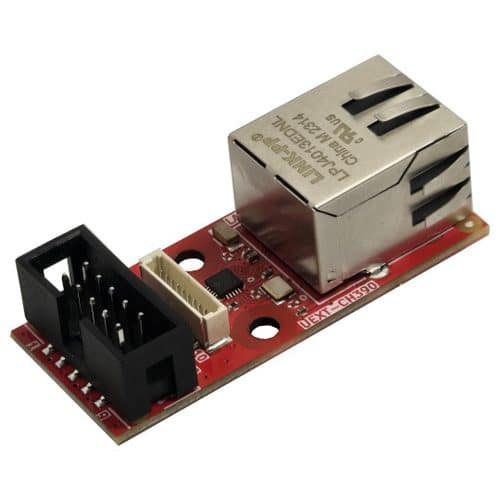 The SPI-to-Ethernet module Olimex built around the WCH CH390 controller.
Boards that ship without an Ethernet MAC — Raspberry Pi Pico, Pico 2, and the ESP32-S3, ESP32-C3, ESP32-C5, ESP32-C6 parts — can now hang a wired link off the SPI header for €4.95. UEXT-CH390 is a 50×21mm module, fed from the host's 3.3V rail, negotiating 10BASE-T or 100BASE-TX. It buys integration time, not bandwidth; the bus, not the PHY, sets your ceiling.
The debug scene behind that verdict is a familiar one: a node that behaves for a week on the bench and then starts dropping association inside a metal enclosure, where every retransmit shows up in your log as application latency. When a cable can be routed, the radio argument ends. This module is the cheap way to close that argument on chips that were never given a MAC.
What is actually on the UEXT-CH390 board?
One controller doing both MAC and PHY, plus a connector that quietly dictates your whole harness. Reading Olimex's published specs against WCH's own documentation gives you the itemised list:
- Controller: the WCH CH390, described on the manufacturer's product page as "an industrial-grade Ethernet controller" with "built-in 16K bytes SRAM" and a parallel or SPI serial interface. No separate PHY, no RMII pin grab.
- Link: 10BASE-T and 100BASE-TX with auto-negotiation, plus Auto-MDIX, so TX/RX polarity is not a bring-up task.
- Addressing: a preprogrammed MAC address per chip, so no external EEPROM and no fleet-wide collision from a hardcoded address in your config.
- Offload: hardware generation and checking of IPv4/IPv6 TCP and UDP checksums per the CH390 manual, which keeps CRC work off the host core.
- Interface: a standard UEXT header plus a second 1mm pitch pUEXT interface. Olimex's UEXT specification defines the 10-way connector as 3.3V, GND, UART, I2C and SPI (MISO, MOSI, SCK, CS).
- Power: the 3.3V supply is taken from either connector — one rail, one regulator, one place for a droop to hide.
- Port and outline: an RJ45 on a 50×21mm card, as reported by CNX Software at launch.
One number deserves scepticism on both sides. WCH's documentation lists CAT5/CAT6 runs to 120 m, which is longer than the 100 m channel budget IEEE 802.3 assumes. Treat the extra 20 m as margin from a DSP-based transceiver, not as permission to skip cable certification on an install.
Why wire a board that already has a radio?
Because the deterministic path already exists and it does not need your code. Olimex wrote an RP2040 driver for ESPHome, which extends CH390 support to Raspberry Pi Pico based systems; the RP2040-PICO30U-16 demonstration shows DHCP networking, automatic discovery inside Home Assistant, and over-the-air firmware updates after the initial USB programming. A separate Raspberry Pi Pico SDK example pairs lwIP with a small web server for teams who want the same link without a home-automation framework.
For an ESP-IDF design there is a second, vendor-published route: espressif/ch390 v0.3.0 in the Espressif component registry, which means the same controller is a managed dependency rather than a fork you maintain. Because the module is open source hardware, the KiCad design files, schematics, firmware and examples sit on GitHub, so you can lift the schematic straight onto your own carrier instead of buying the card at volume. If the alternative you are weighing is a wireless mesh instead of a cable, our RP2350 iroh bring-up guide documents what a software-defined uplink costs in flash and RAM.
UEXT-CH390 or W5500 or ENC28J60 — which wired route wins where?
Every SPI Ethernet part answers the same question with a different trade: how much protocol work it removes from your CPU, and how fast you can actually move bytes. The comparison below is the axis competitors' launch coverage skips.
| Route | Link rate | On-chip buffer | Who runs TCP/IP | Bus ceiling | Best fit |
|---|---|---|---|---|---|
| Olimex UEXT-CH390 (WCH CH390) | 10BASE-T / 100BASE-TX | 16 KB SRAM | Host stack (lwIP, ESPHome), with hardware checksum offload in the chip | SPI mode 0 or 3, clock up to 50 MHz | Plugging a MAC-less MCU board into a cable with zero board design |
| WIZnet W5500 | 10/100 Mbps | 32 KB | Hardwired TCP/IP engine, eight sockets offloaded | SPI to about 80 MHz | MCU cycles scarcer than flash; many concurrent sockets |
| Microchip ENC28J60 | 10 Mbit only | 8 KB | Fully in host software | SPI to about 20 MHz | Legacy stock and low-rate control signals; the 10 Mbit wall is fixed |
| Classic ESP32 internal MAC + external RMII PHY | 10/100 Mbps | None needed | lwIP on the ESP32, native MAC path | RMII parallel bus, 8 data/signalling lines | Your own PCB where the silicon already has a MAC — not possible on ESP32-S3, ESP32-C3, ESP32-C5 or ESP32-C6 |
The practical read: W5500 gives you twice the buffering and moves the protocol engine into silicon, so it stays smoother under sustained load. UEXT-CH390 gives you MAC, PHY and a unique address in one part, already fitted with a connector and a cable socket, for €4.95 — which is cheaper than a W5500 breakout plus your time at the soldering iron.
How much traffic does the SPI bus really permit?
This is arithmetic on published numbers, not a measurement of the shipping board, and it is the sentence I would want before committing. A 100 Mbps link carries roughly 12.5 MB/s per direction at the wire. A single-data-line SPI port clocked at the CH390's stated 50 MHz moves 6.25 MB/s full-duplex before you count chip-select framing, register reads, buffer copies and interrupt-free polling — so plan on useful payload landing well under the negotiated link rate. On the host side, Raspberry Pi's own SDK feedback records that RP2040's SCK cannot exceed half the system clock: 62.5 MHz at the default 125 MHz run. The controller's 50 MHz is reachable on paper; your driver overhead decides the rest.
There is a second tax hiding in the connector. UEXT's ten pins are already fully allocated to power, UART, I2C and SPI, with no spare GPIO, so a link-state or interrupt signal cannot ride the classic header and the driver tends to poll status registers instead. That polling is CPU time you pay for even when nothing is moving on the network — worth checking against your task budget before you standardise on it. For a production trust argument on the wireless alternative, our analysis of RP2350 mesh prototyping versus shipped hardware covers why a working demo and a deployed node are different bills of materials.
What breaks first at the bench?
- Shared CS discipline. Putting the module on the same SPI group as an SD card or display means every transaction has to be serialised; a display refresh that holds CS low mid-frame turns into network timeouts.
- The 3.3V rail lies. The card pulls its supply from UEXT or pUEXT, so the PHY's negotiation and transmit bursts land on the host regulator. Probe the rail during link-up rather than trusting the label on the LDO.
- Pitch confusion. 1mm pUEXT and 2.54mm UEXT carry the same signals but not the same mechanical mate — budget the adapter before the deadline.
- Link flapping blamed on firmware. A link that holds at 10BASE-T and stutters at 100BASE-TX is a cabling, termination or supply problem, not a stack problem. Force 10 Mbps to separate the two.
- Both radios up. On ESP32 designs, leaving Wi-Fi enabled and associated while testing the wired path makes every latency measurement meaningless.
- Assuming availability. Pre-order pricing is €4.95 with shipping starting 9 November 2026; a prototype build is fine, a production BOM signed that week is not.
How do you bring it up without losing three days?
- Reserve four SPI pins plus a clean CS, and confirm neither collides with the QSPI flash assignment or an existing peripheral on the same bus.
- Choose the driver path first: the Olimex RP2040 ESPHome driver for home nodes, espressif/ch390 for ESP-IDF, or the Raspberry Pi Pico SDK lwIP example for bare firmware.
- Start the SPI clock conservatively, in mode 0 or mode 3, then step it up while counting CRC and receive-error flags, not just watching for a link-up LED.
- Bring up DHCP from the RP2040-PICO30U-16 reference, confirm the node appears in Home Assistant, and only then design your static lease or mDNS layer.
- Keep the USB programming path open. Over-the-air updates are the payoff, but a brick that cannot be reflashed over USB is a truck roll.
- Log for 48 hours with link-state transitions timestamped, then compare wired jitter against the Wi-Fi baseline you recorded before the swap.
FAQ: what gets asked before the order
Is CH390 supported by ESPHome's built-in Ethernet component on RP2040?
Not in the upstream list. ESPHome's Ethernet documentation covers SPI/PIO controllers W5100, W5500, W6100, W6300 and ENC28J60 for RP2040 and RP2350 — upstream W5500 support on RP2040 only landed in the 2026.4.0 release. CH390 on those hosts comes from the RP2040 driver Olimex published for ESPHome.
Do I need an EEPROM for the MAC address?
No. Each CH390 carries a built-in unique address, which removes one component and one provisioning step from the build.
Does the module support PoE?
The published specification has it taking 3.3V from UEXT or pUEXT with no separate supply input, so if your endpoint needs PoE, plan an external injector and a separate 3.3V stage and verify the numbers yourself.
Will it stream media or a camera feed?
Design to the SPI ceiling, not the negotiated PHY rate. For configuration traffic, telemetry, OTA images and a Home Assistant sensor node that is comfortable; for sustained bulk transfer, benchmark before you promise it.
Should a new PCB use the module or the chip?
Use the module to validate, then place the controller on your own board once volumes justify it — the KiCad files and schematics are published for exactly that move.
Decision sheet and design checklist
Pick UEXT-CH390 when the host has no MAC (RP2040, RP2350, ESP32-S3, ESP32-C3, ESP32-C5, ESP32-C6), when a cable can be routed, and when your traffic is state, config and firmware rather than streams. Choose W5500 when socket count and offload matter more than board area. Choose the classic ESP32 internal MAC with an external PHY when you own the PCB and want RMII. Skip all of them when the node genuinely moves.
- SPI pins free, CS not shared, mode 0 or 3 selected deliberately.
- 3.3V regulator headroom measured through link negotiation, not estimated.
- Throughput budget written down as a payload number, not as the 100Mbps marketing rate.
- Driver path fixed for the product lifetime: ESPHome, ESP-IDF component or SDK lwIP.
- Wired-versus-wireless latency baseline recorded before the swap, after the swap.
- Recovery path kept over USB before OTA is trusted in the field.
References
- WCH CH390 product page (interface, buffer, MAC and offload details): https://www.wch-ic.com/products/CH390.html
- Espressif component registry — espressif/ch390 v0.3.0: https://components.espressif.com/components/espressif/ch390/versions/0.3.0/readme
- ESPHome Ethernet component documentation and supported controller list: https://esphome.io/components/ethernet/
- Olimex UEXT connector specification (rev. B): https://www.olimex.com/Products/Modules/UEXT/resources/UEXT_rev_B.pdf
- Raspberry Pi Pico SDK feedback on maximum SPI clock: https://github.com/raspberrypi/pico-feedback/issues/39
- CNX Software launch report on the UEXT-CH390 module: https://www.cnx-software.com/2026-11-06/olimex-uext-ch390-spi-to-ethernet-module-targets-raspberry-pi-and-esp32-mcu-boards-running-esphome/
Maya Brooks is an embedded systems engineer at Electronics & Engineering. For corrections or bench results from your own UEXT build, write to info@electronicseng.com.